

Workflows
Easy guide to learn Recursive Workflows in 10 minutes
A recursive workflow is a workflow that can schedule itself to run in the future. They help you work on a large list, one item at a time.
Himanshu Sharma · ·7 min read

URL parameters in Bubble are incredibly versatile and powerful. In other words, you can use URL parameters to pass information between pages and trigger workflows.
Let’s see how this works by doing a quick exercise.
Imagine we have a website that allows people to log in and access a members-only page. Once they’re inside their account, the users should be taken through an onboarding process specific to new users.
The best way to do this is by creating a workflow that is activated when someone accesses the website with specific URL parameters like ?type=new_account&onboarding=true.
We could create a workflow in the Bubble editor that runs only when the parameter type=new_account and onboarding=true.
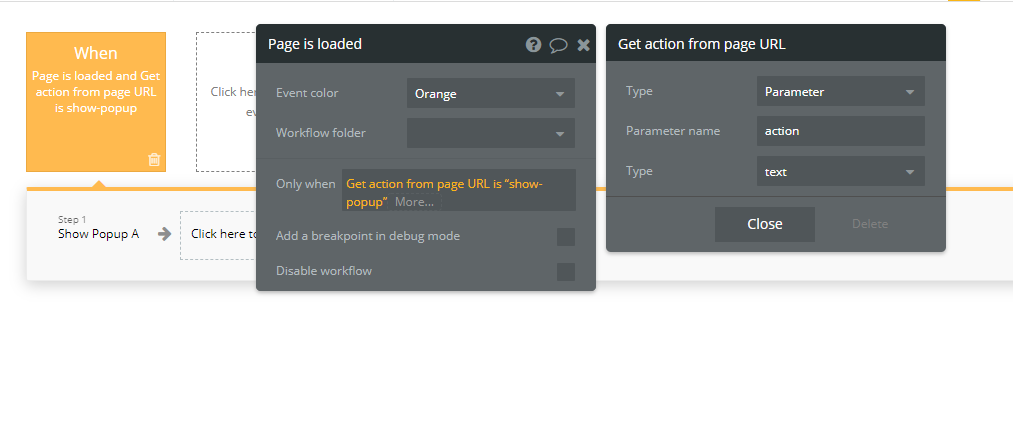
Let’s assume that you’re sending a parameter “action” to a page. On this page, you have a popup. You want to show the popup if the URL parameter contains “show-popup” as the value of the URL parameter.
To do this, we create a new event which happens on page load.
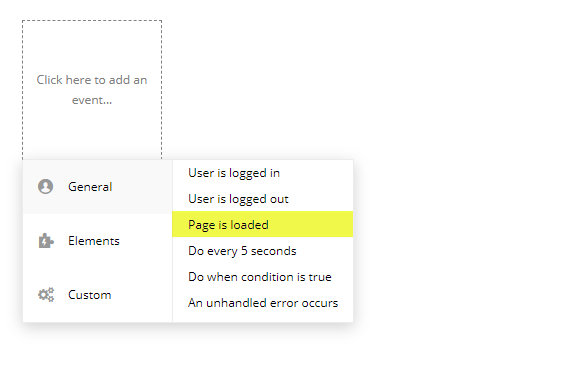
On every page load, we’ll check the URL and if it matches our condition, we’ll trigger the workflow. To do this, we add an “Only when” condition in the event.
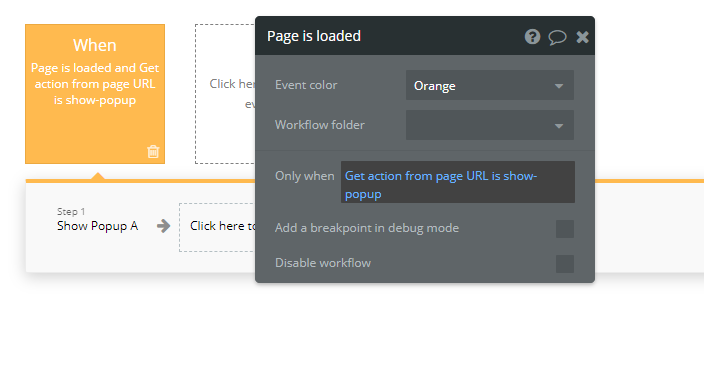
This condition will search the URL for “action” parameter and if its value is “show-popup”, this workflow gets triggered.
We can create long, complex workflows based on the URL parameter. We can update our database, show/hide elements, schedule backend workflow etc. Anything that is possible with a workflow.
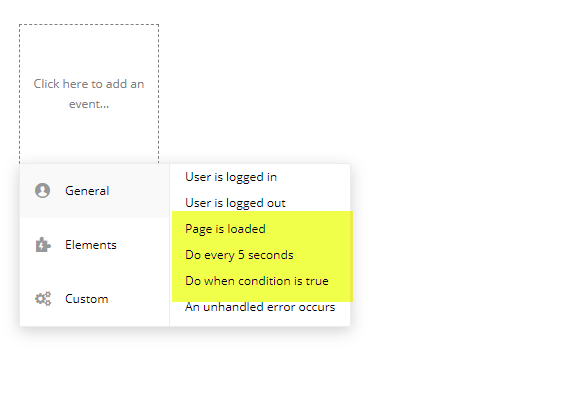
Depending on the use case, you can also use the other event triggers.
Bookmark
Searching database using URL parameters
We can search and filter our Bubble.io app database to find a record using URL parameters. You can search using unique id or any field in the data type.
Bookmark
Single Page Apps in Bubble.io without code
You’ve likely heard about Single Page Apps (SPA) at least once on the Bubble forum. Since Single Page Apps don’t navigate users to other pages, it’s important to figure out how you’ll handle content visibility.
If you need some help with your Bubble app or if you need a team of Bubble developers to build a Bubble app for you, reach out to me at himanshu@nocodeassistant.com. You can also follow me on Twitter.
Continue reading
A recursive workflow is a workflow that can schedule itself to run in the future. They help you work on a large list, one item at a time.
Backend workflows are server-side workflows in Bubble.io. Use them to schedule actions in the future or work with a big list.
A nice tip on how to show a popup when a user lands on a specific page. You can customize popups based on where the visitor is. For instance, you can show a payment alert if someone lands on a page which mentions pricing or make them fill out an email form if they land on the landing page.

