

General Tips
Complete Guide to Master Groups in Bubble
What are Popups, Floating Groups, Group Focus, Repeating Groups and Groups? Where and how should you use them?
Himanshu Sharma · ·12 min read

Bubble is adaptable. Lists are one of the main reasons why it is so. This Bubble tutorial will teach you how to work with lists.
The two main aspects of them are creating and manipulating.
First, let’s understand what lists are in Bubble, how we can use them and when we should avoid them (according to Bubble’s co-founder Josh). We’ll then see how we can create a list and manipulate them.
Lists are just what the name implies. A list of ‘items’. They can be empty, have one entry, or have multiple entries.
In layman’s terms, they are just lists of values.
So if your field’s type is ‘text’, they can contain multiple text values - ‘apple’, ‘banana’, and ‘cherry’. But they can also be empty. Lists can also be a list of numbers, images, files, dates etc.
You can store a list of texts, images, files, dates, date ranges, data types, and option sets.
While they can store a list of items, they are basic. There is no other data stored with them. There is no way to associate more information with any item on the list.
A more advanced list is created when the field type (so what you would typically have text, number, image) is configured to another data type. It can either be a system one (User - you can have a list of Users who like your Blog Post) or one you created yourself.
So you can create a list of entries in another table/thing. You can add/remove/clear the list just as you can with text values.
Lists are helpful in Bubble. However, you need to consider the use case of the list you create.
A list is helpful when the number of items in the list won’t be large. According to Bubble’s co-founder, Josh
If your list is short – you know you’ll never have more than 20 - 30 invoices per company, for instance – then yes, using a list will load a little faster. However, … the list will start slowing things down once the total number of invoices goes beyond the number you actually want to display at any one time.
So use lists only when you know the list size will be small. To build a functionality similar to wishlists, likes, retweets etc., where the number of items can be thousands, use a different data type.
Bookmark
List or Searches - Which is faster in Bubble.io?
Is it quicker to fetch data from lists or searches? It depends on a few factors, and no one approach will work in all scenarios.
There are two ways you can create a list in Bubble
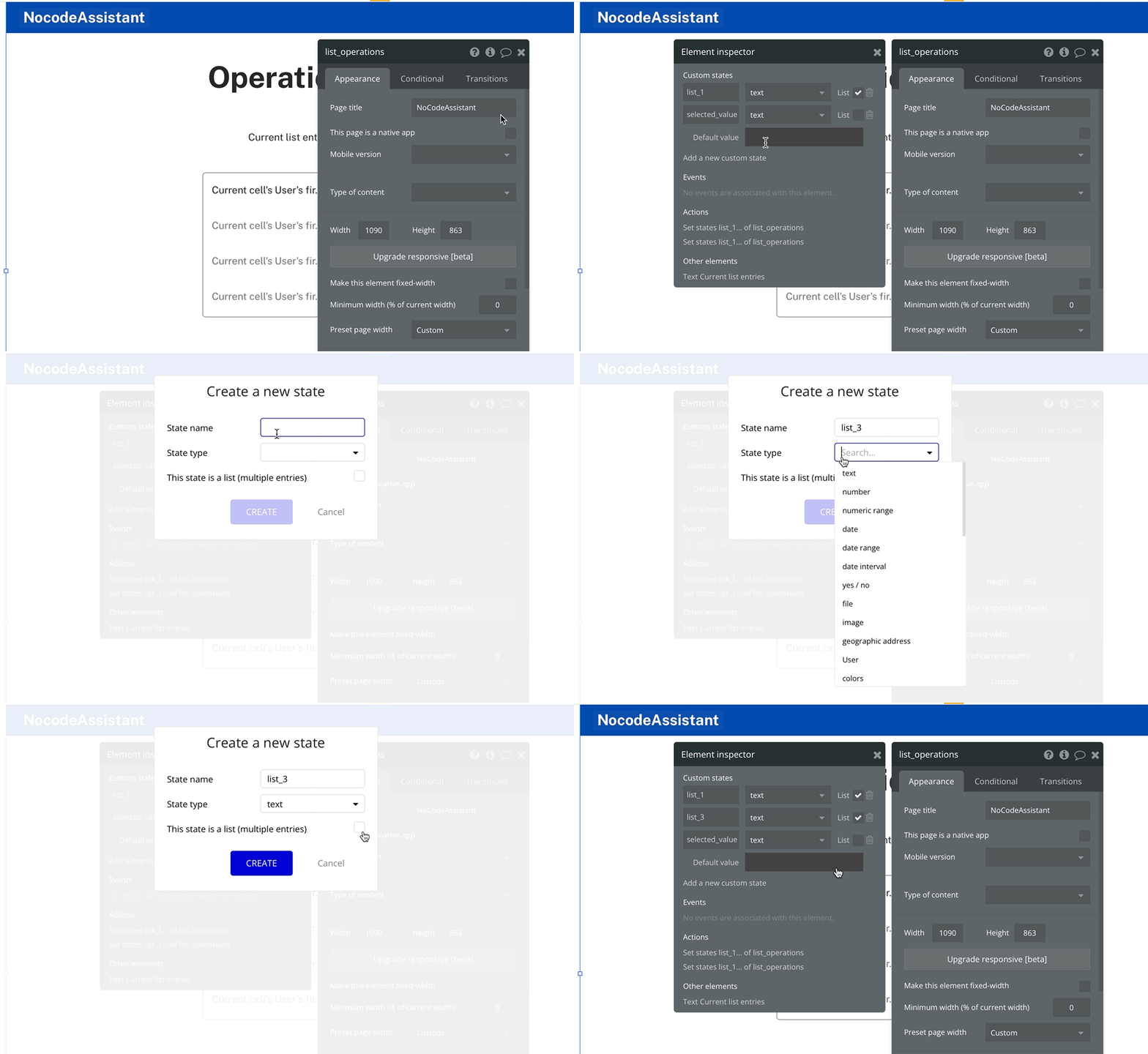
Typically we use a list in a custom state for temporary purposes. It is not stored in the database, and the value is erased when you refresh the page. Everyday use cases are for calculations, selection of items etc.
To create a list in a custom state, we need to select an element (preferably the page itself) - and create a custom state on the page. Just check the ‘This state is a list’ checkbox.
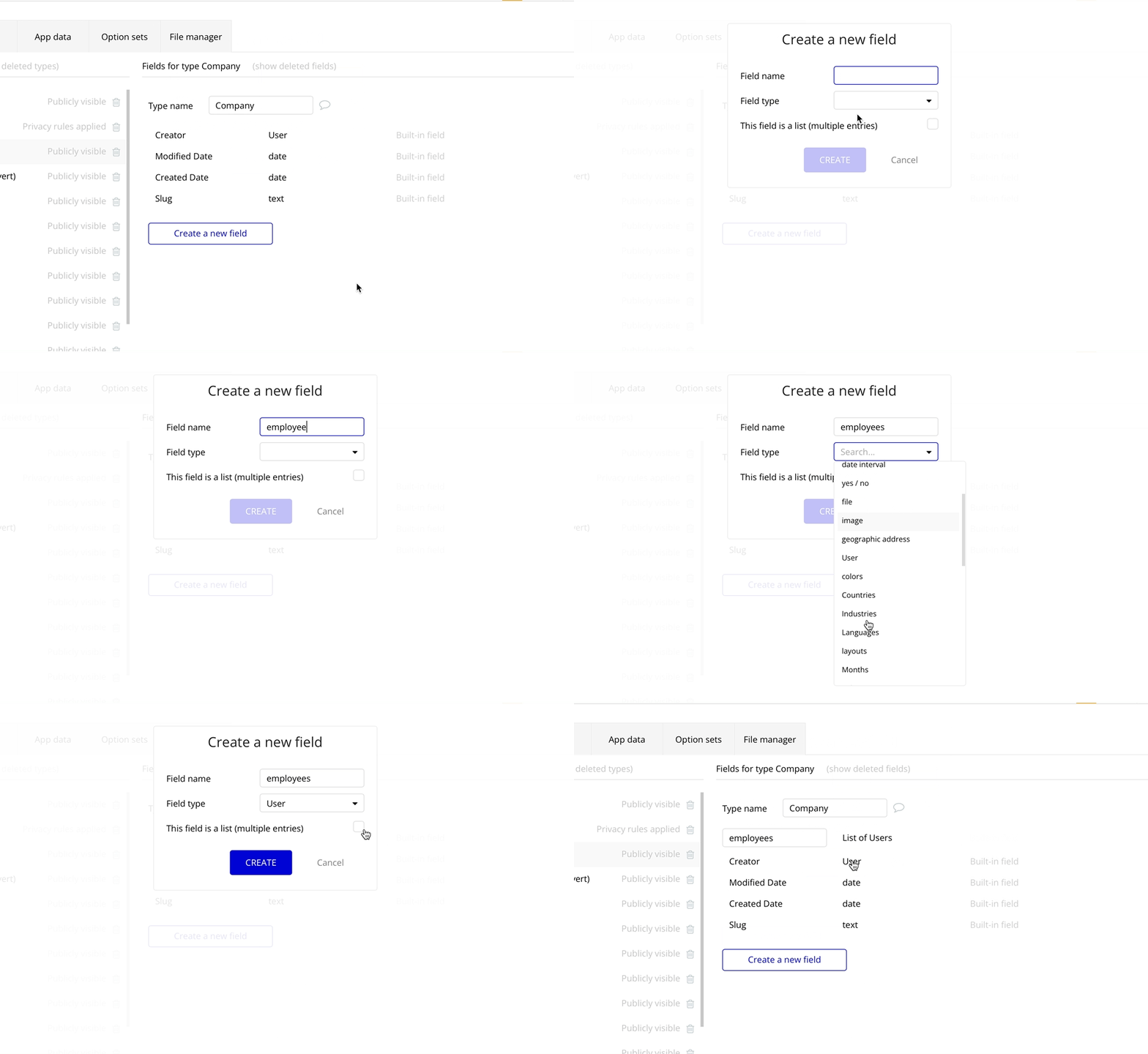
A list created in a data type is stored in the database. We keep this list in a data type as a field, and to make changes to the list, we use workflows.
I have created a repeating group for this tutorial. The repeating group is fetching a list of Users and there are two buttons - Add and Remove.
Bookmark
How to display a list in a Repeating Group in Bubble.io
Displaying a list of texts in a RG is tricky, but it is easy once you understand how RGs work.
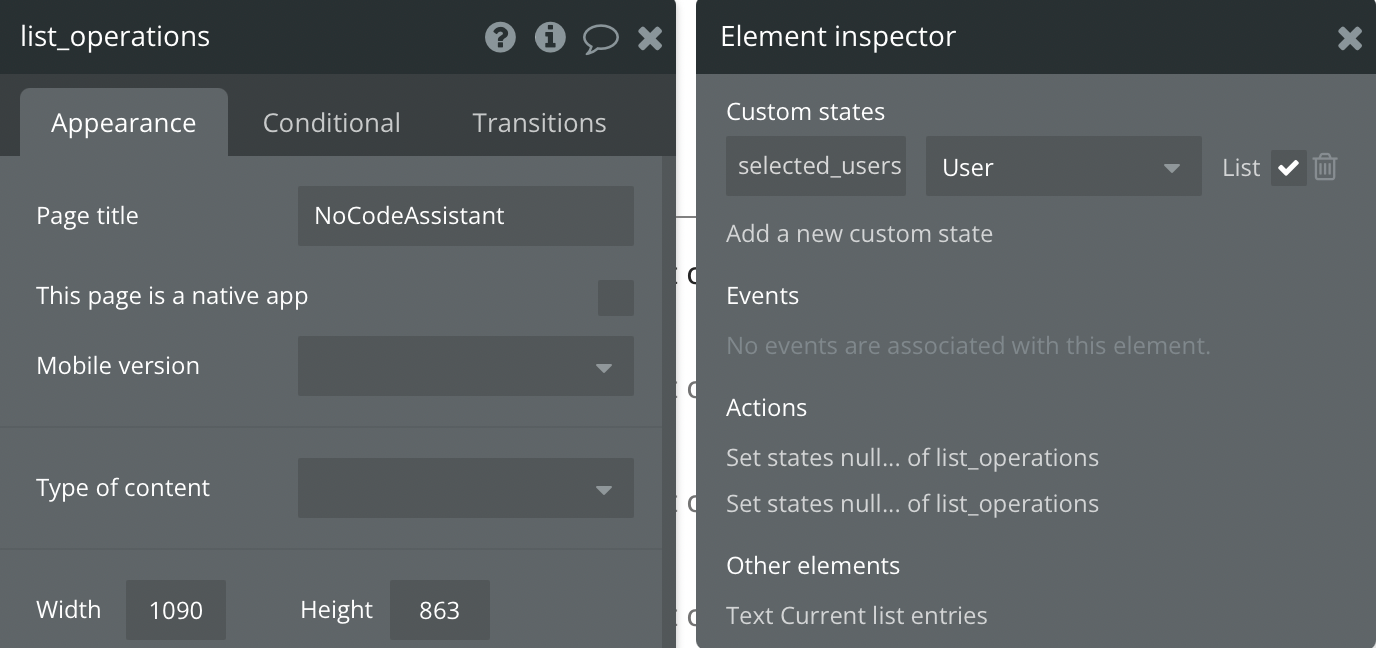
I want to store the list in a custom state called selected_users with a Type of content of User.
There is also a field named selected_users in the User table which stores a list of Users.
The simplest workflow. To add an item to a list, we need to use either the :plus item or the add operator.
I have created a repeating group for this tutorial. The repeating group is fetching a list of Users, and there are two buttons - Add and Remove.
You can use any other method to refer to an item you want to add to the list.
Custom state
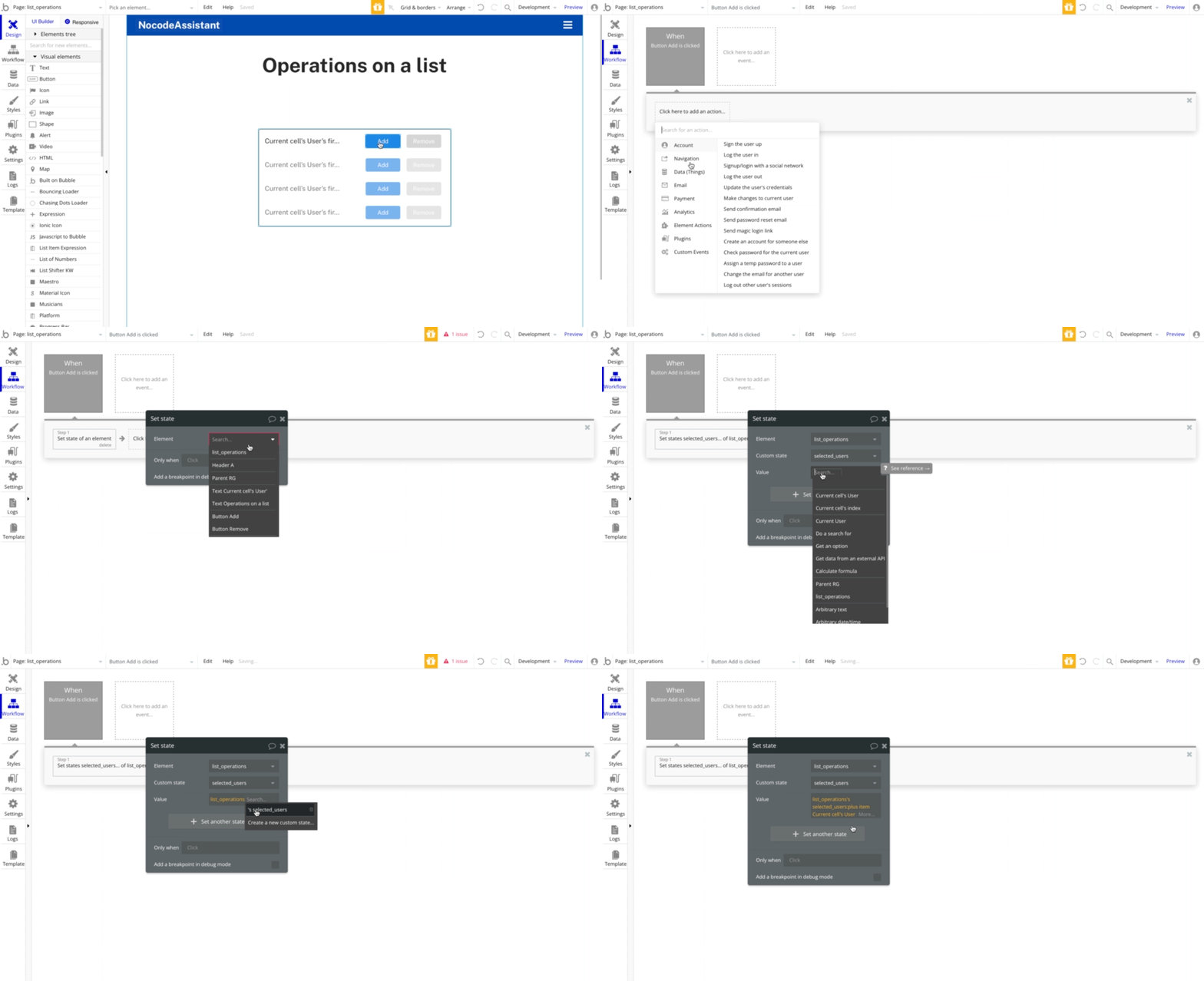
Adding an item to a list in a custom state
Database
To save an item to a list stored in the database, the operator changes from :plus item to add.
Assuming that there is an existing record in the User table where we can store a list of Users, the workflow will be
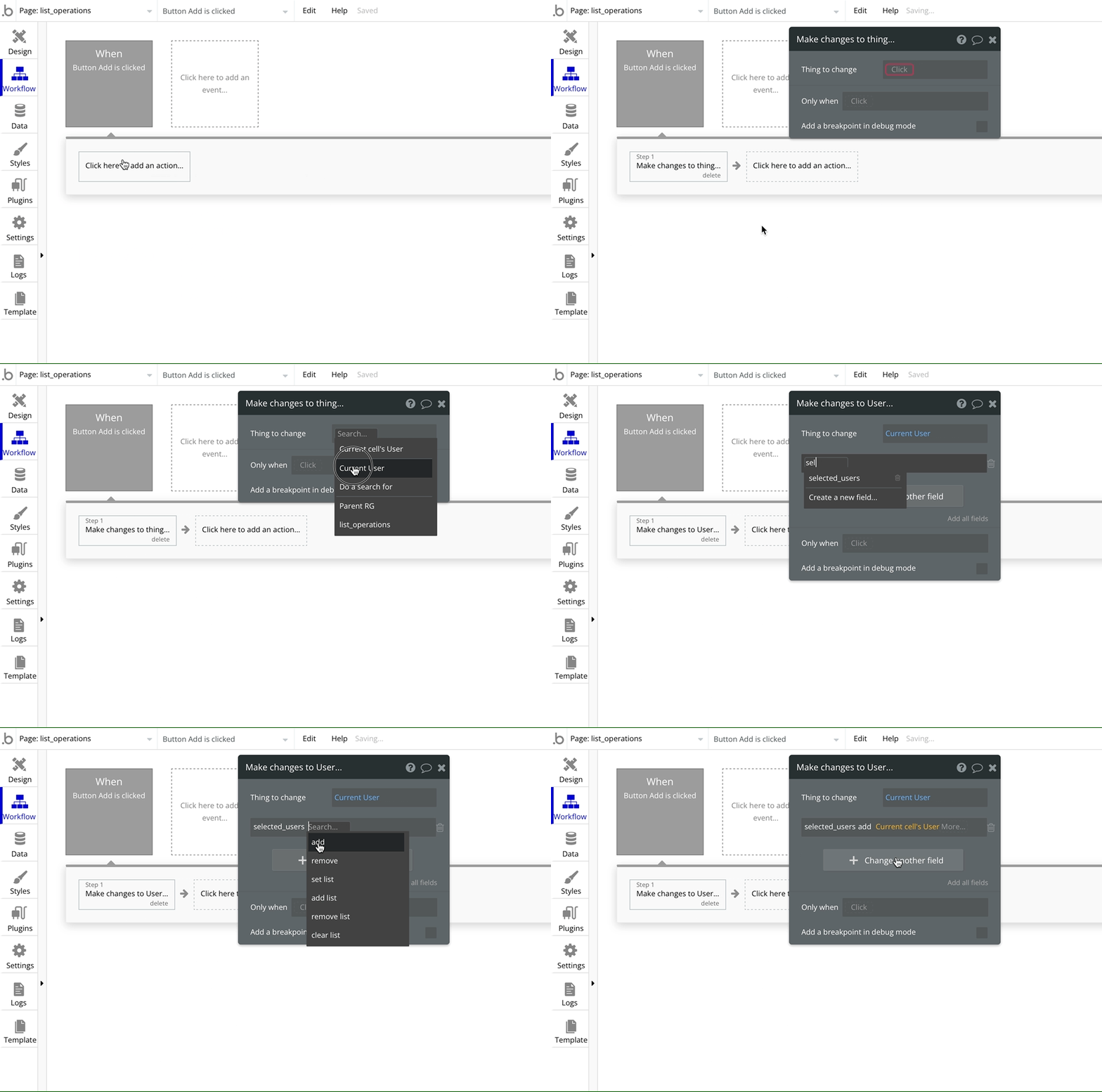
Adding an item to a list in the database
To remove an item from a list, we need to use either the :minus item or the remove operator.
I am using the same setup that I used in the example above. The repeating group fetches a list of Users, and there are two buttons - Add and Remove.
You can use any other method to refer to an item you want to add to the list.
Custom state
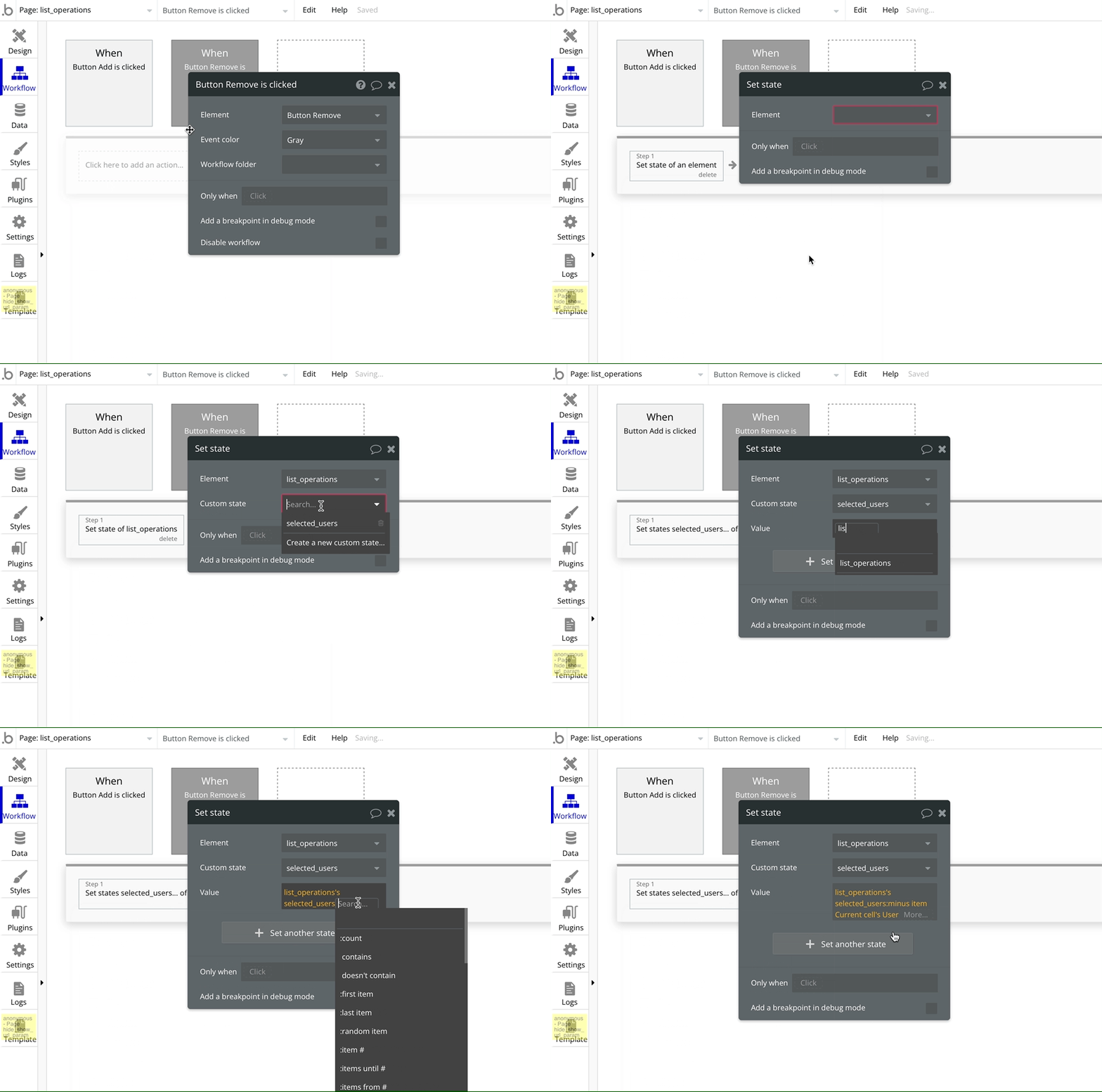
Remove an item from a list in a custom state
Database
To remove an item from a list stored in the database, the operator changes from :minus item to remove.
Assuming that there is an existing record in the User table where we can store a list of Users, the workflow will be
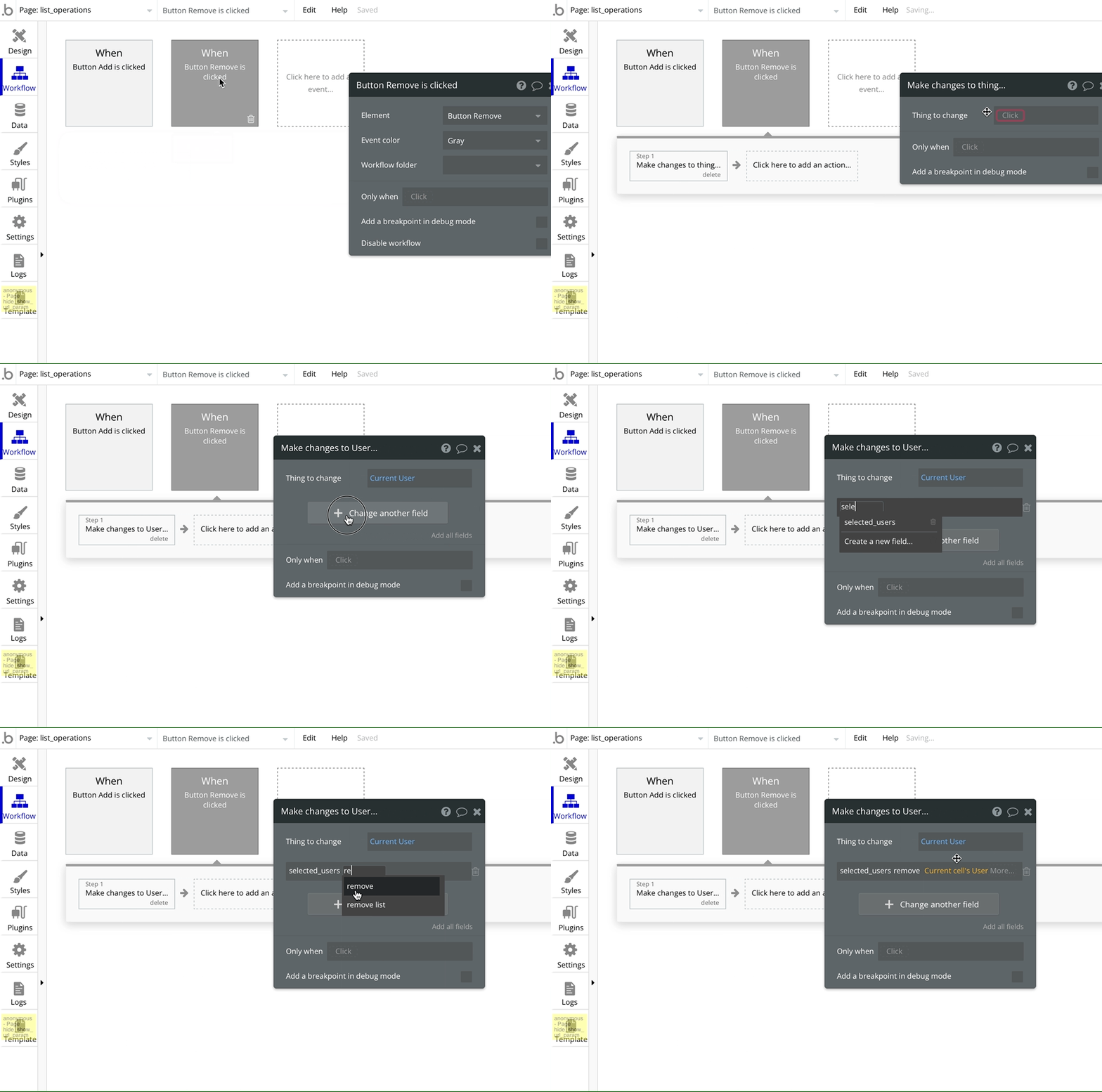
Remove an item from a list in the database
We have a repeating group that displays a list of users. We want to add all the repeating group’s users to a list which may or may not have any existing users.
The Bubble operator we will use for this operation will be merged with or add list.
Custom state
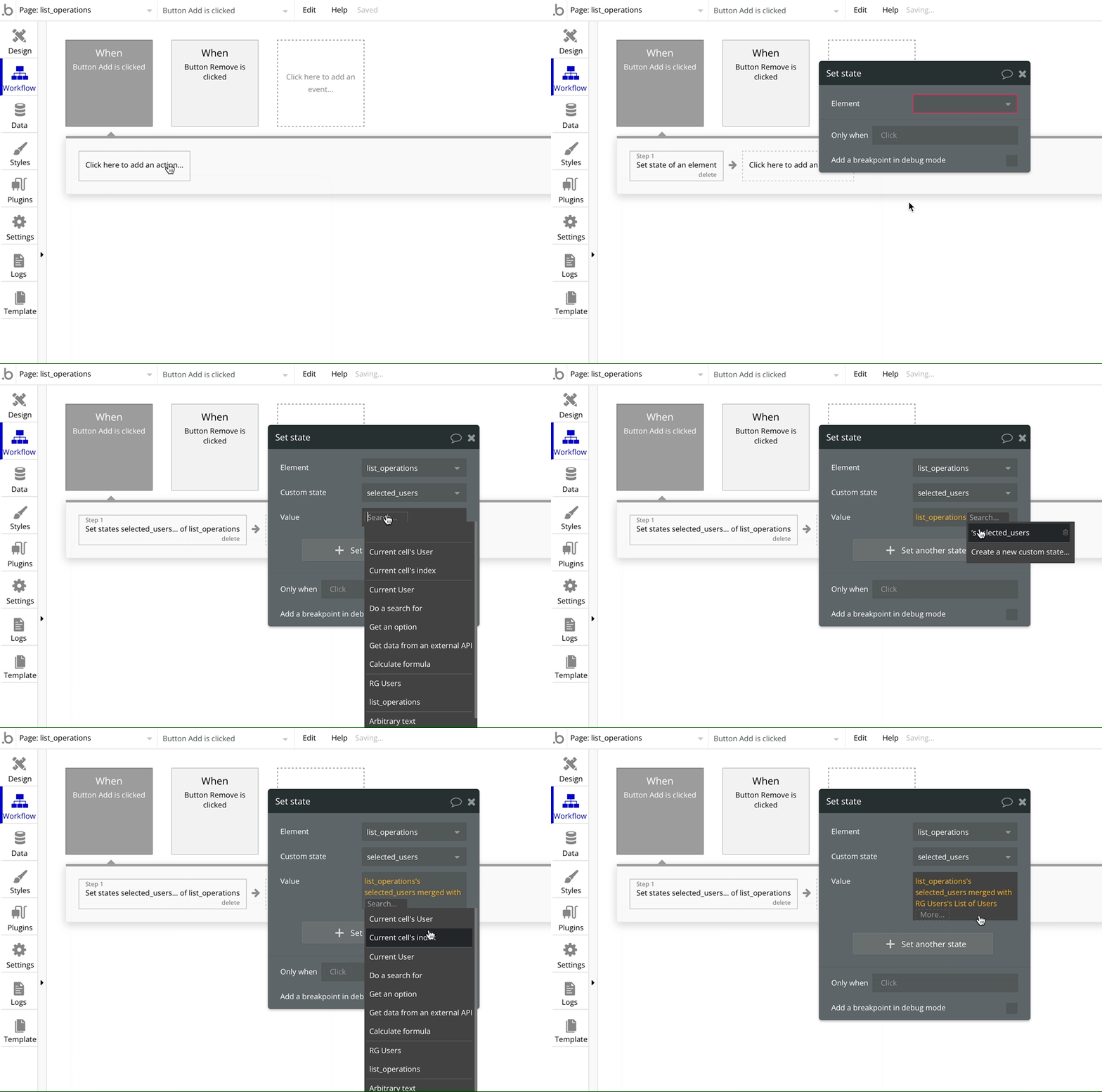
Adding a list of items to a list in a custom state
As we want to add the entire repeating group’s value to the custom state list, the value will be the custom state’s value merged with the repeating group list of Users.
Database
To add a list of items to a list stored in the database, the operator changes from merged with to add list.
Assuming that there is an existing record in the User table where we can store a list of Users, the workflow will be
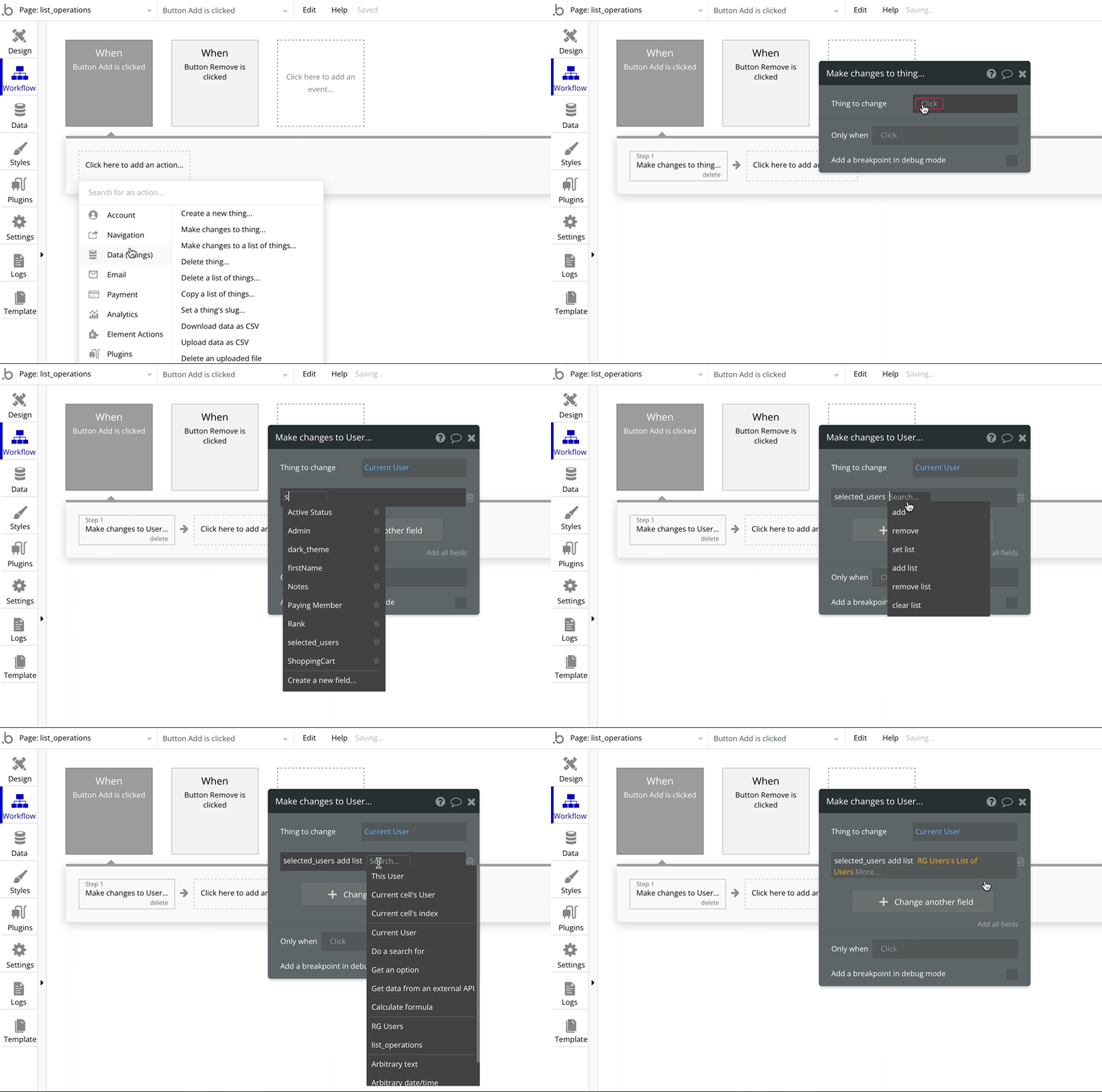
Adding a list of items to a list in the database
We have a repeating group that displays a list of users. We want to remove all the repeating group’s users from a list which may or may not have any existing users.
The Bubble operator we will use for this operation will be :minus list or remove list.
Custom state
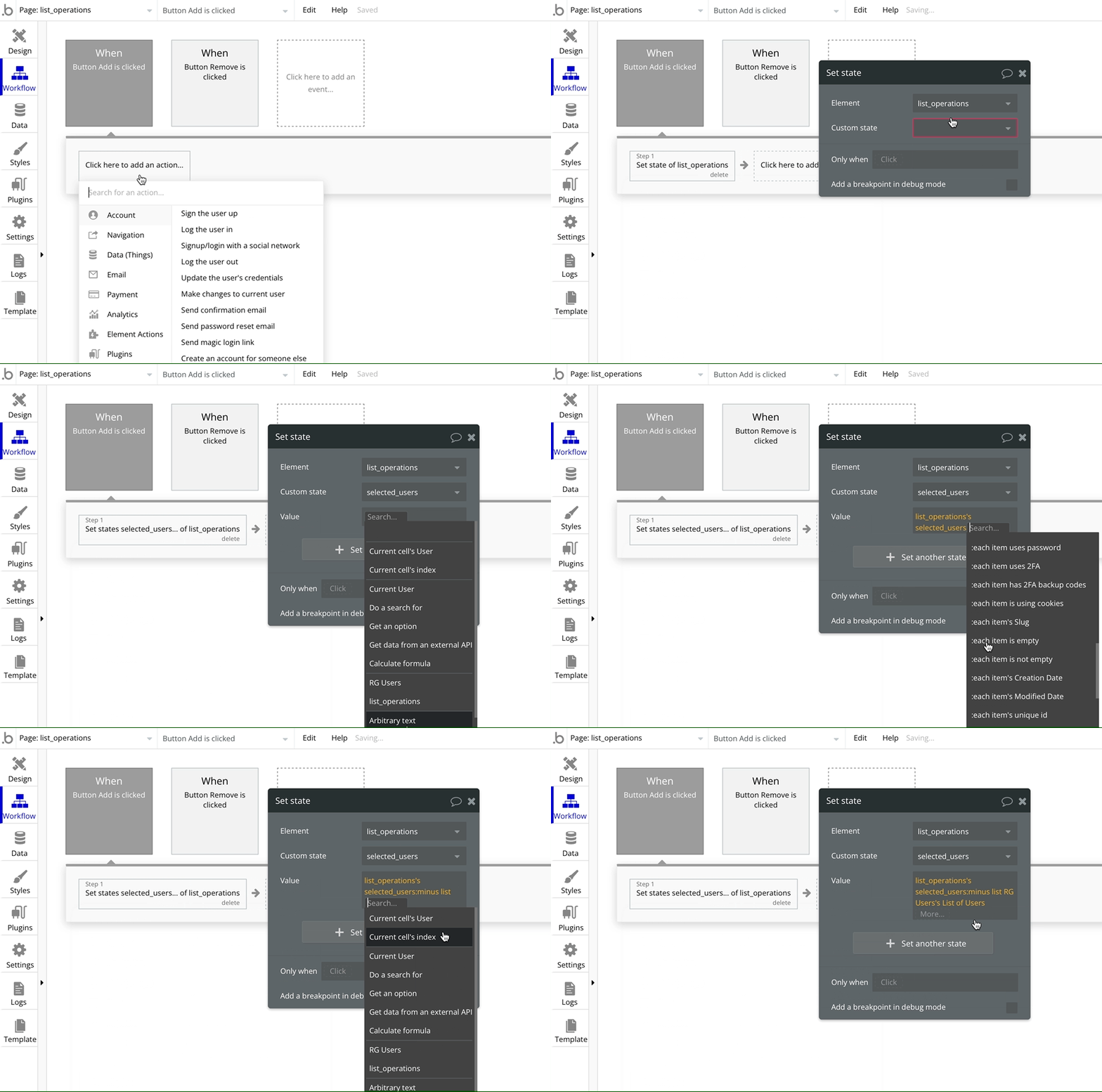
Removing a list of items to a list in a custom state
As we want to add the entire repeating group’s value to the custom state list, the value will be the custom state’s value :minus list of the repeating group list of Users.
Database
To remove a list of items to a list stored in the database, the operator changes from :minus list with to remove list.
Assuming that there is an existing record in the User table where we can store a list of Users, the workflow will be
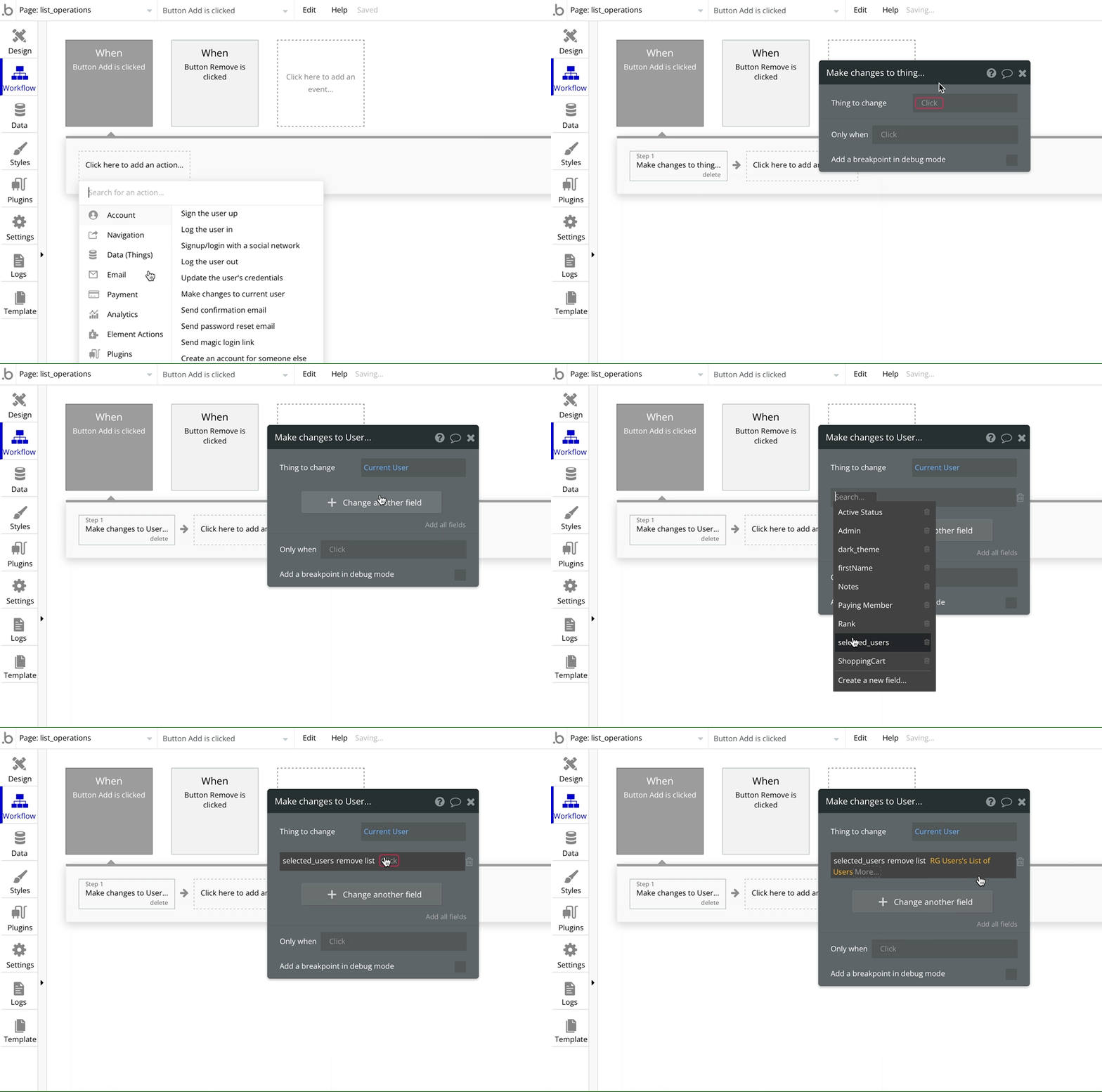
Removing a list of items from a list in the database
Bookmark
Beginner’s guide to sorting in a Repeating Group in Bubble.io
In this Bubble.io tutorial, we’ll learn how to sort the results in your repeating group. You can sort items in ascending order or descending order.
You can join two lists together, provided they are of the same type (Users, text, numbers etc).
Say we have a list of Users whose Status field is Inactive and another list of Users whose Status field is Dormant. We want to merge these two lists together and display the result in a repeating group.
You might think that it’s easy.
I’ll put two constraints in the data source of the repeating group. Unfortunately, that won’t work. The constraints work as AND and not OR. So the result of such a search will be empty as there won’t be any Users with both the Status options.
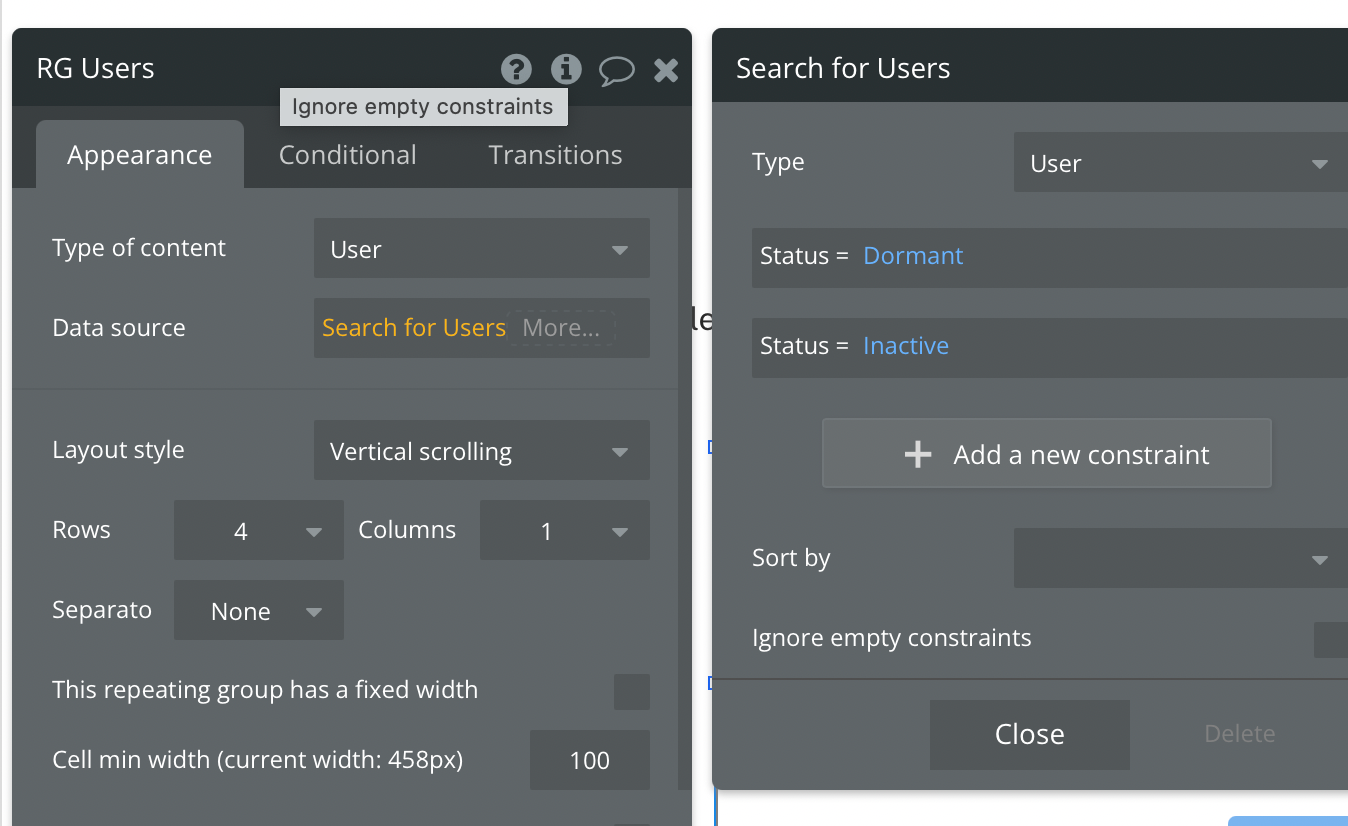
Incorrect method
The solution is to use the merged with operator.
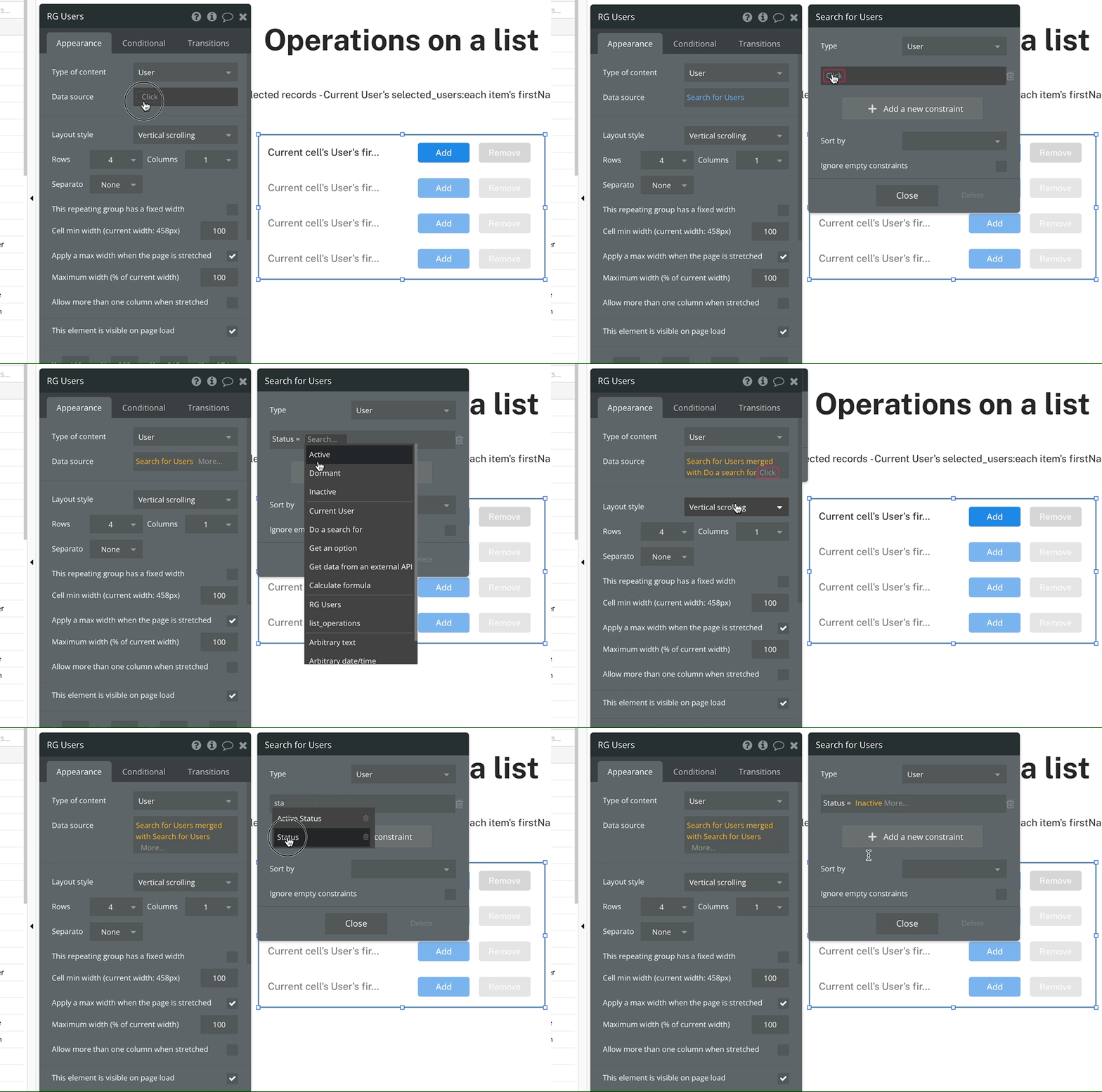
Correct method to merge two lists
The merged with operator will allow us to define the constraints on the same field twice. This will function as a OR search instead of AND.
Bookmark
Honest Bubble.io Review - the most user-friendly and powerful app builder?
Bubble is an amazing platform to build your business. It’s easy to use and can be up and running in a very short time. However, there are some limitations to what Bubble can do. Get an honest review of the pros and cons of Bubble.io.
If you need some help with your Bubble app or a team of Bubble developers to build a Bubble app for you, reach out to me at himanshu@nocodeassistant.com. You can also follow me on Twitter.
Continue reading
What are Popups, Floating Groups, Group Focus, Repeating Groups and Groups? Where and how should you use them?
Bubble is an amazing platform to build your business. It’s easy to use and can be up and running in a very short time. However, there are some limitations to what Bubble can do. Get an honest review of the pros and cons of Bubble.io.
When building Bubble apps, you might feel overwhelmed with the work needed. One way to save time and resources is with templates. However, using a template may not be the best choice for everyone.

