Often, you’d run into a situation where you need a unique value for each user. The method to check that a value is unique can be extended to various situations. It can be a username, slug or anything else.
To explain how you can let a user set a unique username for them.
I’ve placed a repeating group to search and display the user’s details. And on the right, I’ve set up input to type a new username. Upon selecting a user on the left, their details will be displayed in the User Info group on the right.
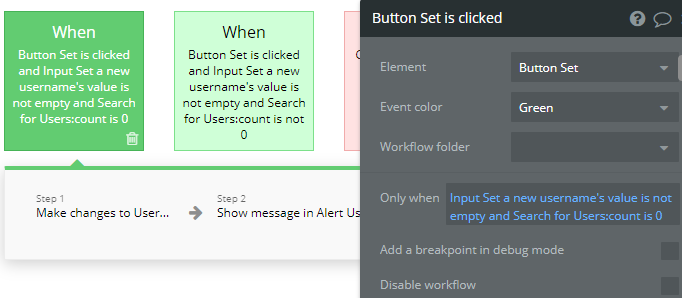
When we click on the button Set, I set up two workflows to check the validity of the new username. The username/slug details are stored in the User data type for each user.
Check if the username is unique
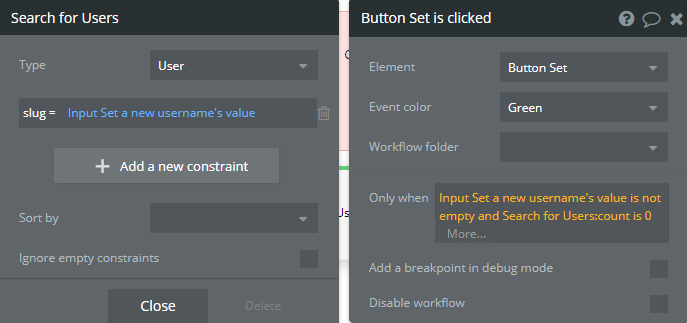
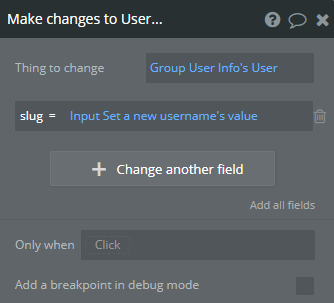
To check if the username is unique, I search for Users with constraint as Slug=Input’s value. If the count is 0, the username is unique, and I can display a success message.
If the username is not unique
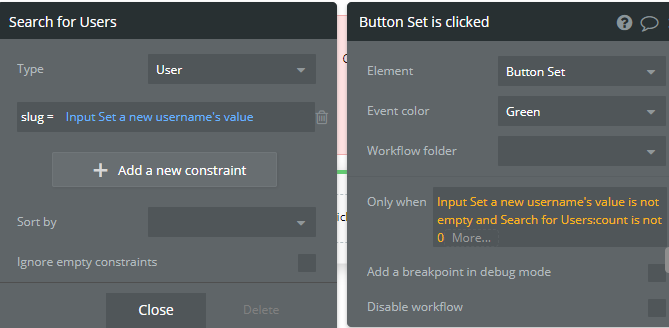
If the count > 0, another user has already taken the username/slug, and it is not valid.
I then display an error message to the user to try a new username.
Learn how to effectively use Boolean fields in Bubble to optimize your database management. Improve your app's efficiency and user experience with the simple but versatile Boolean field.